
If you don't use a clearing account, QuickBooks or Xero may show duplicate settlement entries.
These entries come from:
1. Rotessa (Integration)
2. Your bank account (bank feed)
How this happens
Rotessa integrates with QuickBooks Online and Xero by syncing transactions to match invoices created in the accounting software.
- When an invoice created through the integration is imported, a corresponding transaction is generated in Rotessa based on the invoice’s due date. The invoice will continue to appear as unpaid until the transaction has been fully processed, settled, and updated as paid through the integration.
If you have a bank feed connected to the integration (i.e., automatic import of transaction data, such as a business chequing account), and your payment account is set to the same account where the bank feed records transactions, then in your accounting software, you will see individual entries from Rotessa for each paid invoice. Meanwhile, the funds deposited into your bank account will appear as a single lump sum for each settlement period, even though they may represent multiple individual invoice payments.
- These will appear as duplicate entries, one from the bank feed and one from the Rotessa integration.
- This can clutter the bank register with many individual line items for each invoice payment, all tied to a single bank deposit.
To avoid this
Set the payment account to Undeposited Funds or Clearing Account
This can be called 'Rotessa clearing account' or something similar.
- This keeps the payment records out of the bank register.
- Once the lump sum deposit appears in the bank feed, users can match it to the group of payments recorded in the clearing account.
- This preserves one-to-one invoice payment tracking while keeping the bank register clean and accurate.
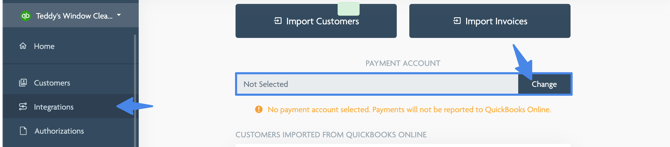
For QuickBooks Online:
Valid account types include: bank and current assets
Valid detail types include: cash on hand, inventory, other current assets, prepaid expenses, and undeposited funds
For Xero:
Valid account types include: bank or any account that has payments enabled.